DataJoint pipelines can range from simple scripts to full-fledged software projects. This chapter describes how to organize a pipeline for production deployment.
When Do You Need a Full Project?
Simple scripts and notebooks work well for:
Learning DataJoint
Exploratory analysis
Small pipelines with a single user
Examples and tutorials (like those in this book)
A full project structure is recommended when you need:
Version control with Git for the pipeline code
Multiple collaborators working on the same pipeline
Automated computation workers
Reproducible deployment with Docker
Object storage configuration
Installation as a Python package
Pipeline ≡ Git Repository
A production DataJoint pipeline is implemented as a dedicated Git repository containing a Python package. This repository serves as the single source of truth for the entire pipeline definition:
Schema definitions — Table structures and relationships
Computation logic — The
makemethods for automated tablesConfiguration — Object storage settings
Dependencies — Required packages and environment specifications
Documentation — Usage guides and API references
Containerization — Docker configurations for reproducible environments
Standard Project Structure
The pipeline code lives in src/workflow/, following the modern Python src layout:
my_pipeline/
├── LICENSE                  # Project license (e.g., MIT, Apache 2.0)
├── README.md                # Project documentation
├── pyproject.toml           # Project metadata and configuration
├── .gitignore               # Git ignore patterns
│
├── src/
│   └── workflow/            # Python package directory
│       ├── __init__.py      # Package initialization
│       ├── subject.py       # subject schema module
│       ├── acquisition.py   # acquisition schema module
│       ├── processing.py    # processing schema module
│       └── analysis.py      # analysis schema module
│
├── notebooks/               # Jupyter notebooks for exploration
│   ├── 01-data-entry.ipynb
│   └── 02-analysis.ipynb
│
├── docs/                    # Documentation sources
│   └── index.md
│
├── docker/                  # Docker configurations
│   ├── Dockerfile
│   ├── docker-compose.yaml
│   └── .env.example
│
└── tests/                   # Test suite
    └── test_pipeline.py
Directory Purposes
| Directory | Purpose |
|---|---|
src/workflow/ | Pipeline code — schema modules with table definitions |
notebooks/ | Interactive exploration and analysis notebooks |
docs/ | Documentation sources |
docker/ | Containerization for reproducible deployment |
tests/ | Unit and integration tests |
Database Schema ≡ Python Module
Each database schema corresponds to a Python module within src/workflow/:
| Database Construct | Python Construct |
|---|---|
| Database schema | Python module (.py file) |
| Database table | Python class |
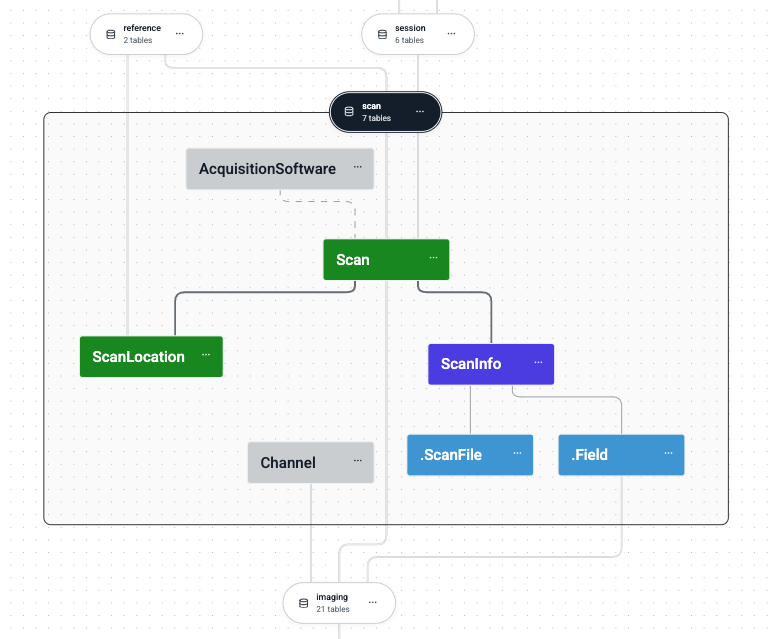
Each database schema corresponds to a Python module containing related table definitions.
Each module defines a schema object and uses it to declare tables:
# src/workflow/subject.py
import datajoint as dj

schema = dj.Schema('subject')

@schema
class Subject(dj.Manual):
    definition = """
    subject_id : int
    ---
    subject_name : varchar(100)
    """
Pipeline as a DAG of Modules
A pipeline forms a Directed Acyclic Graph (DAG) where:
Nodes are schema modules
Edges represent dependencies (Python imports and foreign key bundles)
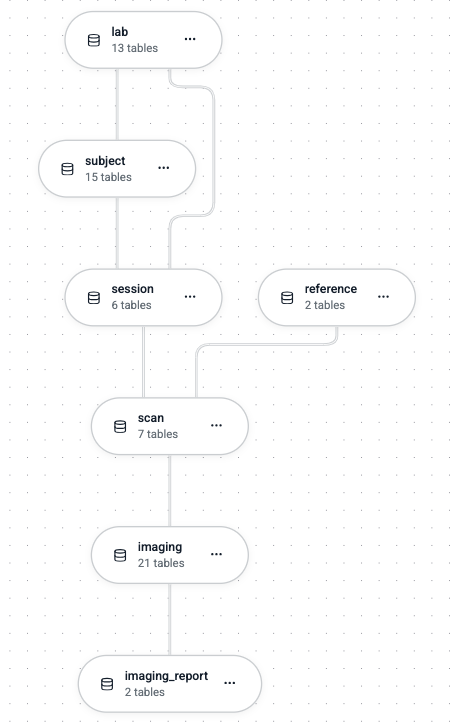
Schemas form a DAG where edges represent both Python imports and foreign key relationships.
Downstream modules import upstream modules:
# src/workflow/acquisition.py
import datajoint as dj
from . import subject  # Import upstream module

schema = dj.Schema('acquisition')

@schema
class Session(dj.Manual):
    definition = """
    -> subject.Subject    # Foreign key to upstream schema
    session_id : int
    ---
    session_date : date
    """
Cyclic dependencies are prohibited — both Python imports and foreign keys must form a DAG.
Project Configuration
pyproject.toml
The pyproject.toml file defines project metadata, dependencies, and object storage configuration:
[build-system]
requires = ["setuptools>=61.0"]
build-backend = "setuptools.build_meta"

[project]
name = "my-pipeline"
version = "0.1.0"
description = "A DataJoint pipeline for experiments"
readme = "README.md"
license = {file = "LICENSE"}
requires-python = ">=3.9"
dependencies = [
    "datajoint>=0.14",
    "numpy",
]

[project.optional-dependencies]
dev = ["pytest", "jupyter"]

[tool.setuptools.packages.find]
where = ["src"]

# Object storage configuration
[tool.datajoint.stores.main]
protocol = "s3"
endpoint = "s3.amazonaws.com"
bucket = "my-pipeline-data"
location = "raw"
Object Storage
The [tool.datajoint.stores] section configures external storage for large data objects:
| Setting | Description |
|---|---|
protocol | Storage protocol (s3, file, etc.) |
endpoint | Storage server endpoint |
bucket | Bucket or root directory name |
location | Subdirectory within the bucket |
Tables reference stores for object attributes:
@schema
class Recording(dj.Imported):
    definition = """
    -> Session
    ---
    raw_data : object@main    # Stored in 'main' store
    """
Docker Deployment
Dockerfile
FROM python:3.11-slim

WORKDIR /app

RUN apt-get update && apt-get install -y \
    default-libmysqlclient-dev \
    build-essential \
    && rm -rf /var/lib/apt/lists/*

COPY pyproject.toml README.md LICENSE ./
COPY src/ ./src/
RUN pip install -e .

CMD ["python", "-m", "workflow.worker"]docker-compose.yaml
services:
  db:
    image: mysql:8.0
    environment:
      MYSQL_ROOT_PASSWORD: ${MYSQL_ROOT_PASSWORD}
    volumes:
      - mysql_data:/var/lib/mysql
    ports:
      - "3306:3306"

  minio:
    image: minio/minio
    command: server /data --console-address ":9001"
    environment:
      MINIO_ROOT_USER: ${MINIO_ROOT_USER}
      MINIO_ROOT_PASSWORD: ${MINIO_ROOT_PASSWORD}
    volumes:
      - minio_data:/data
    ports:
      - "9000:9000"
      - "9001:9001"

  worker:
    build:
      context: ..
      dockerfile: docker/Dockerfile
    environment:
      DJ_HOST: db
      DJ_USER: root
      DJ_PASS: ${MYSQL_ROOT_PASSWORD}
    depends_on:
      - db
      - minio

volumes:
  mysql_data:
  minio_data:
Managed Deployment with DataJoint Platform
For teams that prefer managed infrastructure over DIY deployment, the DataJoint Platform is specifically designed for hosting and managing full DataJoint projects. The platform provides:
Managed databases and object storage
Automated computation orchestration
Web-based data exploration and visualization
Team collaboration tools
Enterprise support
This eliminates the need to configure and maintain your own database servers, storage backends, and worker infrastructure while following the same project conventions described in this chapter.
Best Practices
One schema per module — Never define multiple schemas in one module
Clear naming — Schema names use lowercase with underscores; table classes use CamelCase
Explicit imports — Import upstream modules at the top of each file:
from . import subject
from . import acquisition
Credentials in environment — Keep database credentials in environment variables, not in code
Use the src layout — Prevents accidental imports from the project root
Summary
A production DataJoint pipeline project:
Lives in a Git repository
Contains a LICENSE file
Places code in
src/workflow/Maps one schema to one module
Forms a DAG with no cyclic dependencies
Configures object storage in
pyproject.tomlIncludes Docker configurations for deployment
For simple scripts and learning, see the examples throughout this book. Use this full project structure when you’re ready for production deployment.